

Comparison
StrategyQuant alternative: four strategy builders compared, and the trap they all share
 Tommy J.Founder, RoboticEA
If you are looking for a StrategyQuant alternative, start by being clear about what StrategyQuant X is: a deep, mature desktop workstation for generating trading strategies with genetic programming and stress-testing them before export. Some traders need all of that. Others want something lighter: a tool that runs in the browser, has real recorded spread data built in, shows results year by year, and has a free tier you can try without installing anything. This guide compares StrategyQuant X with four alternatives, including ours, using only facts we checked on each vendor’s own site in November 2026.
The short answer
Credit where due
What StrategyQuant X does well
StrategyQuant X (often searched as “strategy quant”) is one of the best-known strategy generators, and its feature list explains why. As of November 2026, its own pages describe the following:
- Genetic strategy generation. The homepage says it uses “machine learning techniques and genetic programming”. It combines entry and exit conditions, order types and price levels, then filters the results by criteria you choose, such as net profit or Sharpe ratio.
- A wide robustness toolkit. Monte Carlo simulations, walk-forward optimisation and the walk-forward matrix, system parameter permutation, optimisation profiles and what-if simulations. All of these can run automatically as part of the build. According to the pricing page, the advanced robustness tests and the walk-forward optimiser come with the Professional edition and above.
- Many export targets. The FAQ lists MetaTrader 4, MetaTrader 5, TradeStation, MultiCharts and JForex, and says it generates full source code for each.
- Runs on your own machine. Windows, Mac, Linux and Windows Server, per the FAQ, with tick-precision backtesting, a free forex/CFD/crypto data pack, an integrated data manager and import of your own data.
- Depth for advanced users. Custom indicators, strategy templates, custom workflows, multi-market and multi-timeframe strategies, and portfolio construction from uncorrelated strategies.
Pricing, as of November 2026, is a lifetime licence rather than a subscription: Starter at $1,290 one-time or 12 monthly payments of $129, Professional at $1,490 or 12 × $149, and Ultimate at $2,900 or 12 × $290. The page also shows higher figures next to the Professional and Ultimate prices, which look like struck-through list prices. Starter and Professional include a year of updates and support. Each licence is tied to one computer. A 14-day trial with full functionality is available and needs no credit card. Purchases are described as generally non-refundable, so use the trial. All of this is on the pricing page.
Fit
Who StrategyQuant suits
StrategyQuant X is built for heavy desktop power users: people who will run long builds on their own hardware, set up their own data, chain robustness tests into custom workflows and assemble portfolios. If you export to TradeStation or MultiCharts as well as MetaTrader, or you want Monte Carlo and walk-forward testing inside the same tool as the generator, it covers ground that lighter tools, ours included, do not. A one-off licence also works out cheaper over several years than any subscription, if you keep using it.
If that describes you, StrategyQuant X may already be the right tool, and you may not need an alternative. The rest of this guide is for people who want something different.
Trade-offs
Why traders look for a StrategyQuant alternative
None of these are defects. They are trade-offs that come with a powerful desktop tool, and they matter more for some traders than for others:
- The cost is paid up front. $1,290 is the entry price for a licence, and the walk-forward and advanced robustness tools start at the Professional edition. That is a lot to commit before you know whether automated strategies suit you.
- It runs on your machine. Installation, data and compute are all on you, and the licence is tied to one computer.
- It does a lot. A full research workstation has many settings. Some people want a short path from an idea to a validated MetaTrader 5 file.
- Spread and data are yours to configure. That flexibility is useful, but a cost model you set yourself is the easiest place for an optimistic assumption to get in.
The caution that applies to all of them
The trap every strategy generator shares, ours included
Every tool in this guide generates many strategies and lets you sort them. That makes the most dangerous button the same in all of them: sort by result. A generator searches a huge space, and the top of any list sorted on the same data that produced it is mostly the luckiest fit. We measured how big that effect is on our own engine, using our own generator’s output.
We backtested 589,471 EURUSD strategy candidates on H1 and H4 with real recorded spread (5,305,239 backtests). We kept the losers, then ran a walk-forward test. At each split point we picked strategies using only the years up to that point, then scored them, compounded, on the years after. The picks first had to earn our own multi-year validation badge, and were then ranked by in-sample return.
+961% → -52%
median compounded return of the top 10, in the years they were picked on and then after
Picked on 2018–2023, scored on 2024–2026. 0% of those 10 were profitable afterwards. The median top-10 pick lost money at all 4 split points. Across every badged strategy at the same split the median was -11%: still negative, but a far smaller loss.
The pattern holds in two other designs from a separate study. In a time holdout, 3 of 4 instrument-timeframe cells lost money out of sample, and the strongest in-sample cell, H1 EURUSD at +40.7%, fell to -26.3%. In an instrument holdout, the top 25 H1 strategies made +15.3% on the instrument they were picked on and -18.3% averaged across 12 others.
+961%
top 10, years in view
-52%
same 10, years after
-26.3%
H1 EURUSD, unseen years
-18.3%
top H1, other instruments
This says nothing bad about StrategyQuant X specifically. If anything, its walk-forward and Monte Carlo tools exist to fight exactly this. It is a warning about how any generator gets used, including ours, and it is why our multi-year badge alone did not save the top 10. Two practical rules follow, whatever you buy:
- Hold something back. Pick on some years and judge on others, or pick on one instrument and test on another. Use several splits: in our time holdout, one split of four pointed the opposite way to the other three and would have been reported as a finding on its own.
- Distrust the top of the list most. In our data, the broad validated set lost less than the top 10 at every split. The harder you select on the past, the more of what you select is noise.
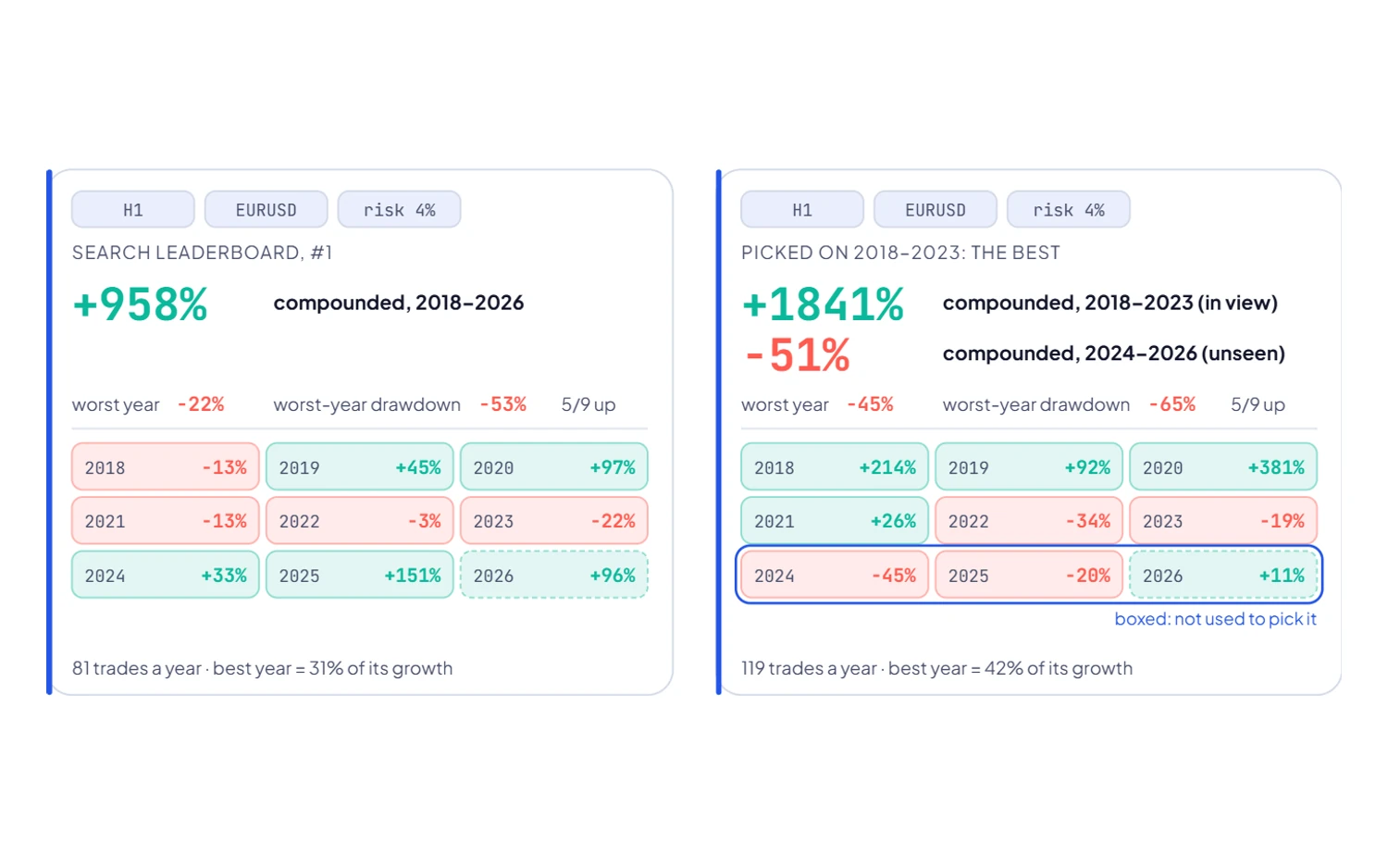
The full method, including the limits of that population, is in the EURUSD study. The wider argument is in do forex robots work?
Side by side
StrategyQuant alternatives compared
Every competitor detail below comes from the vendor’s own site as of November 2026, linked in each section. Where a page does not state something, the table says so rather than guessing.
| Tool | Runs | How strategies are made | Robustness tools | Exports to | Price (November 2026) | Free option |
|---|---|---|---|---|---|---|
| StrategyQuant X | Desktop: Windows, Mac, Linux | Genetic programming, machine learning | Monte Carlo, walk-forward matrix, parameter permutation, what-if | MT4, MT5, TradeStation, MultiCharts, JForex | $1,290–$2,900 one-time, or 12 monthly payments | 14-day full trial, no card |
| EA Studio | Browser | Automatic generator from predefined rules | Out-of-sample, Monte Carlo, multi-market | MT4, MT5 | €690 one year, €1,490 lifetime | Try the app; export needs a subscription |
| Build Alpha | Windows desktop (Mac/Linux via VM) | Genetic algorithm, 7,000+ signals | Noise test, Monte Carlo permutation, walk-forward, vs random | TradeStation, NinjaTrader, MultiCharts, MT4/5, TradingView, ProRealTime, IB Python | $1,497 lifetime | No trial; demo videos |
| fxDreema | Online builder with sign-in | You design it: logic blocks you connect | None described; test after export | MT4, MT5 | Not shown on the purchase page; 1–12 month periods | Free for small projects |
| RoboticEA | Browser | Generator over 34 archetypes, ranges you set | Per-year re-runs with real recorded spread, trade replay | MT5 (.mq5 source) | $49 / mo, $89 / mo, $129 / mo | 250 tokens once, no card |
Alternative 1 — ours, so read it sceptically
RoboticEA: a browser-based StrategyQuant alternative for MetaTrader 5
We built RoboticEA, so weigh this section accordingly. Everything claimed here is something you can check in the product on a free account. It takes a different approach from StrategyQuant X. There is nothing to install, the market data and its recorded spread come with it, and every strategy is judged year by year rather than on one curve.
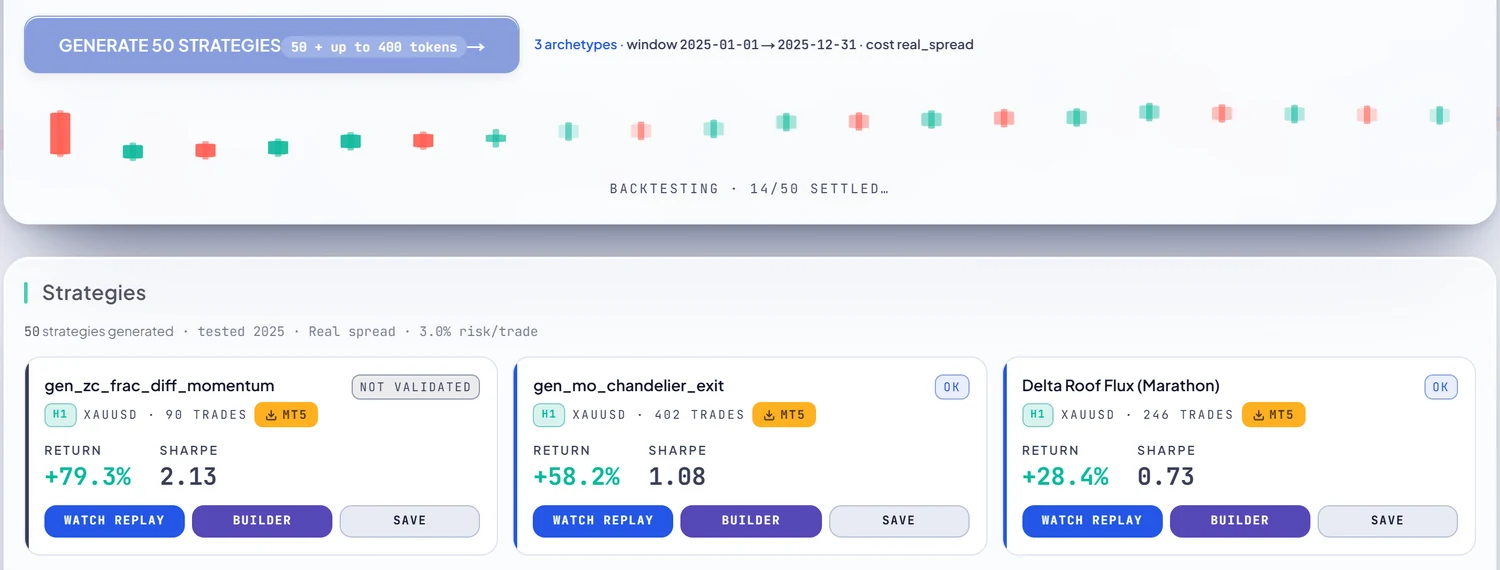
What is different
- It runs in the browser. Generation and backtesting run on our engine, not your machine, so there is nothing to install and nothing for a long build to tie up.
- Real recorded spread is built in. Backtests charge each instrument’s own recorded per-bar spread, plus commission and swap, inside the simulation. You do not have to set up a cost model. It matters: in our gold study, 65 strategies had a perfect 8-year record with costs switched off, and 0 did with the real spread charged.
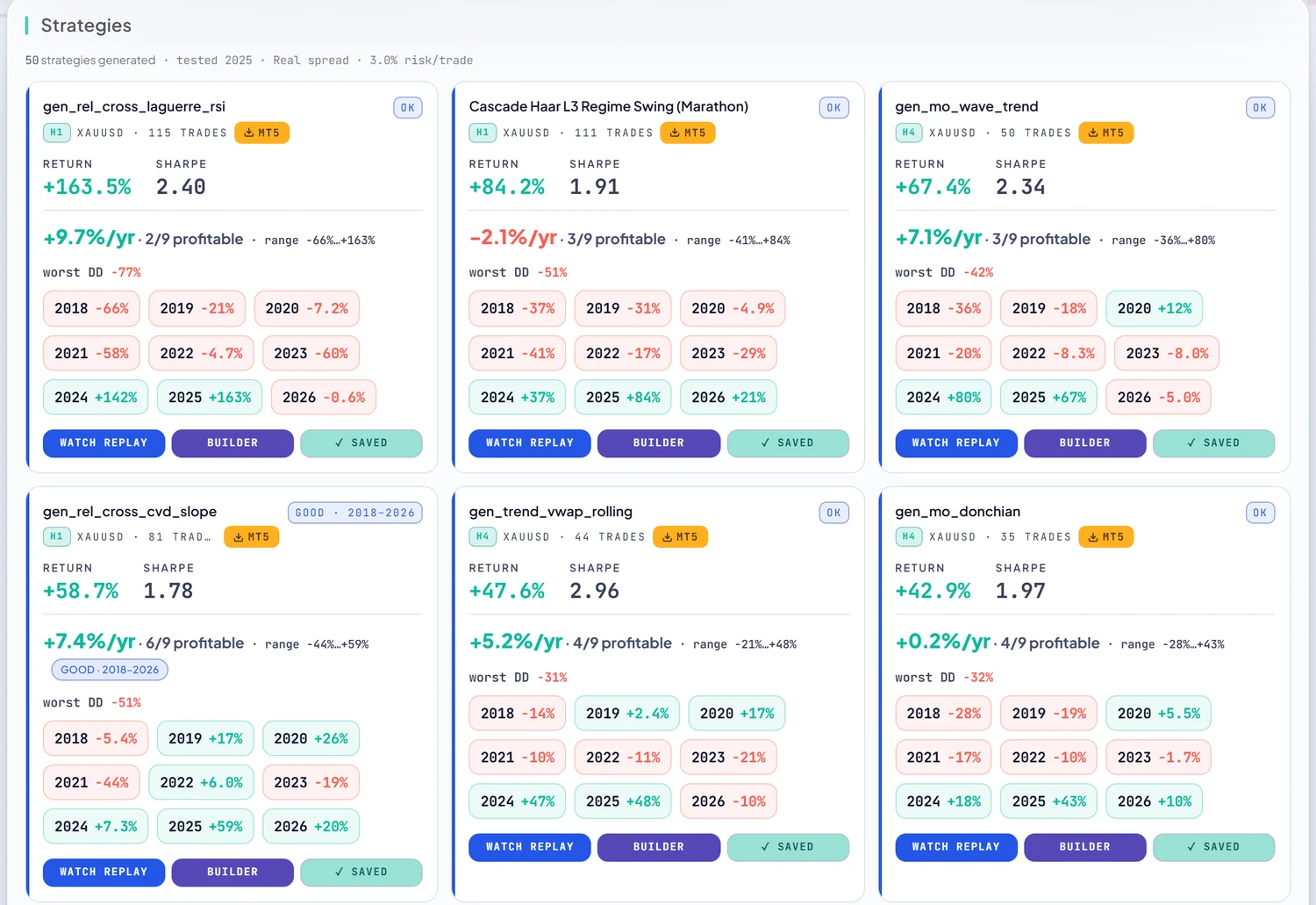
- Per-year validation is the default view. Every year from 2018 is re-run as its own backtest, and the strategy card shows a chip for each year with losses in red. It costs one token per year validated, and with automatic validation on, a batch’s winners arrive already validated.
- Trade replay. You can watch any backtest bar by bar, with entries, exits, stops and the equity curve drawn as it goes. Replaying a run you already have is free.
- MetaTrader 5 export on every plan. You get a readable
.mq5with named, labelled inputs, checked by a structural validation gate before download. Internal helper names are deliberately renamed, so it is readable source, not a commented tutorial. - A free tier. 250 tokens once, with no card, at one token per backtest and one per validation-year. Paid plans are monthly: $49 / mo for 20,000 tokens, $89 / mo for 50,000, and $129 / mo for unlimited, with 50% off when billed yearly.
Where StrategyQuant X is stronger
- Platforms. We export to MetaTrader 5 only. No MetaTrader 4, TradeStation, MultiCharts or JForex.
- Robustness tooling. We have no Monte Carlo or walk-forward module in the product. Our validation is per-year re-runs. Walk-forward tests like the one above are studies we run ourselves, not a button you can press.
- Markets and data. Our instruments are forex pairs, gold and stock indices from our own data store. You cannot import your own data, and there are no single stocks or futures.
- Limits by plan. Free accounts compose from 4 of the 34 archetypes, in batches of up to 50, and cannot edit a strategy’s logic. On Starter and Pro, a single manual backtest covers at most one year. Validation is exempt from that limit.
Best for: MetaTrader 5 traders who want a free way to start, real recorded costs without configuring anything, and results they can read year by year. Full feature list · pricing.
Try the per-year approach free
250 tokens on signing up, no card. Generate, validate each year with real recorded spread, replay the trades, export readable MQL5.
Alternative 2
EA Studio (Expert Advisor Studio)
EA Studio, from Forex Software Ltd at forexsb.com, is the closest like-for-like alternative if what you want is a strategy generator that runs online. The product page calls it a platform “for creating Expert Advisors online”. Its generator “creates and tests your strategies automatically” from a predefined strategy structure. It has out-of-sample testing in the optimiser, Monte Carlo analysis, and one-click multi-market testing. It exports native MQL code for MetaTrader 4 and MetaTrader 5, and you can import data from your MetaTrader broker.
- Good at: browser-based generation with a robustness toolkit, MT4 and MT5 export, and testing on your own broker’s data.
- Consider: you can use the app freely, but export needs a subscription. There is no walk-forward tool on the product page, and the only export targets are MT4 and MT5.
- Price (November 2026): €690 for a one-year account or €1,490 lifetime, both with a premium data feed, and a 30-day money-back guarantee, according to the purchase page.
- Best for: MetaTrader 4 and 5 traders who want StrategyQuant-style generation without a desktop install.
Alternative 3
Build Alpha: the alternative for multi-market, multi-platform traders
Build Alpha is the alternative closest to StrategyQuant X in scope. Its homepage describes a Windows desktop app (Mac and Linux users run it in a virtual machine) that uses a genetic algorithm over a library of 7,000+ signals. Its robustness tests include a noise test, Monte Carlo permutation, walk-forward and a test against random. It covers futures, stocks, ETFs, forex and crypto, and exports to TradeStation, NinjaTrader, MultiCharts, MetaTrader 4 and 5, TradingView, ProRealTime and Interactive Brokers via Python.
- Good at: the widest export list here, and strong coverage of futures and stocks.
- Consider: it is desktop and Windows-first. The licensing page says there is no free trial (“I am a one-man shop”); demo videos are offered instead.
- Price (November 2026): $1,497 one-time for a lifetime licence with upgrades included, shown next to a struck-through $2,497.
- Best for: futures and stock traders who want StrategyQuant-level depth and export to platforms beyond MetaTrader.
Alternative 4
fxDreema: when you want to design the strategy yourself
fxDreema is a different kind of tool, and it belongs here only for people whose real goal is “build an EA without coding” rather than “let a generator search for one”. Its documentation describes “a software tool that helps you to create programs (Expert Advisors and Scripts) for MetaTrader 4 and MetaTrader 5”, in which you “connect blocks in a logical tree”. It does not generate strategies for you. You design the logic, export the program, and the documentation advises you to backtest it before use.
- Good at: turning a strategy you already have in mind into an MT4 or MT5 expert advisor, without writing code.
- Consider: there is no generator and no built-in robustness testing, so the testing is on you.
- Price (November 2026): the purchase page lists a Free plan (up to 10 connections between blocks, 100 blocks per project and 30 projects) and a Full plan bought for 1, 3, 6, 9 or 12 months, with no automatic renewal. It does not show the price itself.
- Best for: traders with a specific rule set who want it turned into an EA.
The common head-to-head
StrategyQuant vs EA Studio
This is the most common comparison, so here it is directly. Both generate strategies automatically and both include Monte Carlo testing. The differences, as each vendor describes its product in November 2026:
| StrategyQuant X | EA Studio | |
|---|---|---|
| Where it runs | Your computer (Windows, Mac, Linux) | In the browser |
| Generation | Genetic programming | Automatic generator from a predefined structure |
| Walk-forward | Yes (Professional and up) | Not listed; out-of-sample in the optimiser |
| Exports | MT4, MT5, TradeStation, MultiCharts, JForex | MT4, MT5 |
| Licence | $1,290–$2,900 lifetime, or 12 payments | €690 a year or €1,490 lifetime |
| Try first | 14-day full trial, no card | Use the app; export needs a subscription; 30-day refund |
In short, StrategyQuant X has more robustness tools and more export targets. EA Studio is lighter, runs in the browser, and has a lower entry price if you only trade MetaTrader.
Practical
How to choose an algorithmic strategy builder
Five questions, in order. The first two will usually settle it.
- Which platform will run the strategy? If it is TradeStation, NinjaTrader or MultiCharts, that narrows the list to StrategyQuant X or Build Alpha. If it is MetaTrader 5, every tool here works.
- Do you want a generator or a builder? A generator searches for strategies for you; a builder like fxDreema turns your own idea into code.
- What spread does the backtest charge, and who set it? On our gold data, zero-cost backtests produced 65 perfect 8-year records, and charging the real spread left 0. Whichever tool you use, know exactly what the cost model is.
- Can you see every year separately? A single compounded curve hides losing years. Ask for the worst year by name.
- How will you avoid fooling yourself? Walk-forward, out-of-sample data, other instruments, or all three. The section above shows what happens without them. Then test the exported EA in MetaTrader 5’s own Strategy Tester. Our real-ticks parity write-up explains how closely it should agree.
FAQ
StrategyQuant alternative questions, answered
What is the best StrategyQuant alternative?
It depends on which part of StrategyQuant X you would give up. EA Studio is the closest browser-based generator for MetaTrader 4 and 5. Build Alpha is the closest in scope for futures and stock traders who export to TradeStation, NinjaTrader or MultiCharts. fxDreema suits traders who want to design an EA themselves from logic blocks rather than generate one. RoboticEA suits MetaTrader 5 traders who want a free tier, real recorded spread built in and per-year validation in the browser.
How much does StrategyQuant X cost?
As of November 2026, StrategyQuant X is sold as a lifetime licence: Starter at $1,290 one-time or 12 monthly payments of $129, Professional at $1,490 or 12 payments of $149, and Ultimate at $2,900 or 12 payments of $290, before tax. Walk-forward and the advanced robustness tests start at Professional. There is a 14-day full trial with no credit card, and purchases are described as generally non-refundable.
StrategyQuant vs EA Studio: what is the difference?
StrategyQuant X is desktop software for Windows, Mac and Linux that generates strategies with genetic programming, includes Monte Carlo and walk-forward testing, and exports to MetaTrader 4 and 5, TradeStation, MultiCharts and JForex. EA Studio runs in the browser, generates strategies automatically from a predefined structure, offers out-of-sample, Monte Carlo and multi-market testing, and exports to MetaTrader 4 and 5. As of November 2026 EA Studio costs €690 for a year or €1,490 lifetime; StrategyQuant X costs $1,290 to $2,900 one-time.
Is there a free StrategyQuant alternative?
Partly. RoboticEA gives every new account 250 tokens once with no card, enough for 250 backtests or validation-years, and MetaTrader 5 export is included; free accounts compose from 4 of the 34 archetypes and cannot edit a strategy's logic. fxDreema is free for small projects, up to 10 connections between blocks. EA Studio lets you use the app freely, but export needs a subscription. StrategyQuant X itself has a 14-day full trial.
Can you trust the best strategies a strategy generator finds?
Not on their in-sample results alone, whichever generator found them, ours included. In our EURUSD walk-forward, the top 10 strategies picked on 2018-2023 by compounded return, after passing our own multi-year validation badge, made a median +961% in those years and -52% over 2024-2026, and 0% of them were profitable afterwards. The median top-10 pick lost money at all 4 split points we tried, and every badged strategy taken together did better, at -11%. Hold back years or instruments, and distrust the top of the list most.
Does RoboticEA export to MetaTrader 4, TradeStation or NinjaTrader?
No. RoboticEA exports MetaTrader 5 expert advisors only, as a readable .mq5 source file with named inputs, on every plan including free. It also has no Monte Carlo or walk-forward module; its validation re-runs each year as a separate backtest with real recorded spread. If you need other platforms, StrategyQuant X and Build Alpha both export to TradeStation and MultiCharts, and Build Alpha also lists NinjaTrader.
Sources. Competitor details were read on 19 November 2026 from strategyquant.com, its pricing and FAQ pages; forexsb.com/expert-advisor-studio and forexsb.com/purchase; buildalpha.com and its licensing page; and fxdreema.com/documentation and fxdreema.com/purchase. Vendors change prices and features, so check before you buy. Our study figures come from the EURUSD walk-forward (5,305,239 backtests on real recorded bars) and from a separate 48,640-run selection study. RoboticEA product figures come from the constants the server meters with. Every figure here is a backtest, not a live result.
Keep reading
What happens to the top picks after they are picked
The EURUSD walk-forward behind the selection chart above, with its limits stated.
Do forex robots actually work?
The population, the best-of slice, and why the ranking does not travel.
A free expert advisor for MetaTrader 5
What the free tier includes and what it does not, and what is inside the exported file.
Does our engine agree with MetaTrader 5?
Run for run against MetaTrader 5's own Strategy Tester on real ticks.